Overview
This article provides a description of the Git branching workflow
used to maintain the createslf package in line with NSS BI
BYOC infrastructure. It explains how branches are structured, how code
moves from one environment to another, and what protection rules apply.
It is intended for all PHS analysts contributing to this project and
serves as a reference for day‑to‑day Git usage.
Acronyms Reference
- BI – Business Intelligence (NSS)
- BYOC – Bring Your Own Code
- PR – Pull Request
- SLF – Source Linkage Files
- UAT – User Acceptance Testing
Branching Structure
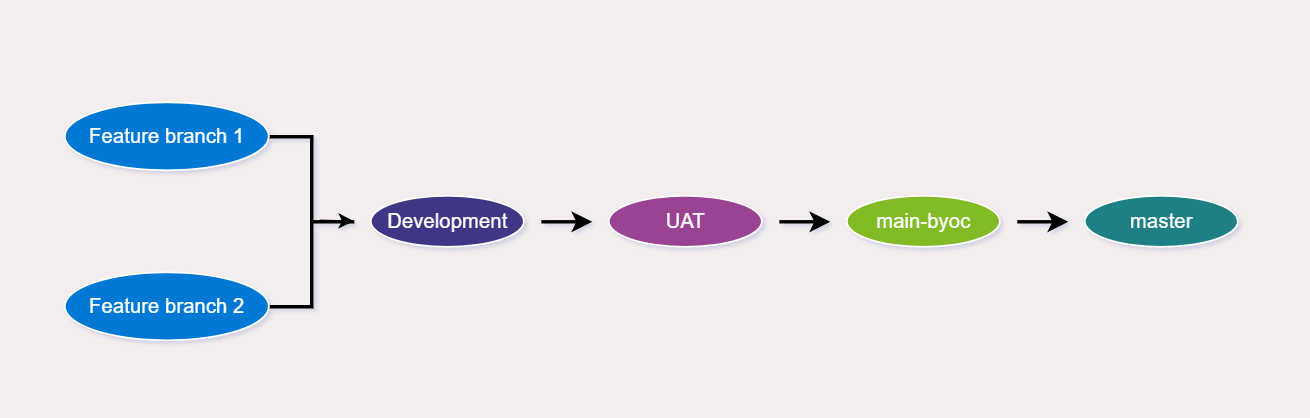
The project uses a three‑tier protected branching model:
master → main-byoc → UAT →
development
Branching Workflow:
master (production) – Represents the code currently deployed in production
- Must be protected: No direct pushes and PRs must be approved by 1 SLF team member + 1 NSS BI member.
- Ensures: A stable, production environment and that all production code has been peer‑reviewed.
main-byoc (infrastructure integration) – Acts as the integration layer between SLF R code and NSS BI BYOC-specific configurations
- Holds the BYOC artefacts including the wrapper and utility scripts.
- Owned primarily by NSS BI.
UAT (User Acceptance Testing) – Used for end‑user testing after changes are validated in development
- PRs must be reviewed by one PHS member and one NSS BI member.
- Code here is deployed into the UAT environment.
- When UAT is successful, code moves to main-byoc → then to master.
development – Represents the current state of code under active development
- PRs must be reviewed by one PHS member.
- All feature branches must be created from this branch.
Feature branches (working branches) – Created when working on issues
- Always created from development
- After testing locally, raise a PR → merge into development